
Feb 18, 2026
What Is a Project Timeline and How Do You Keep It Accurate?
A project timeline is not just a list of dates. It is a system that determines whether teams can trust delivery commitments, manage risk, and make confident decisions as work changes.
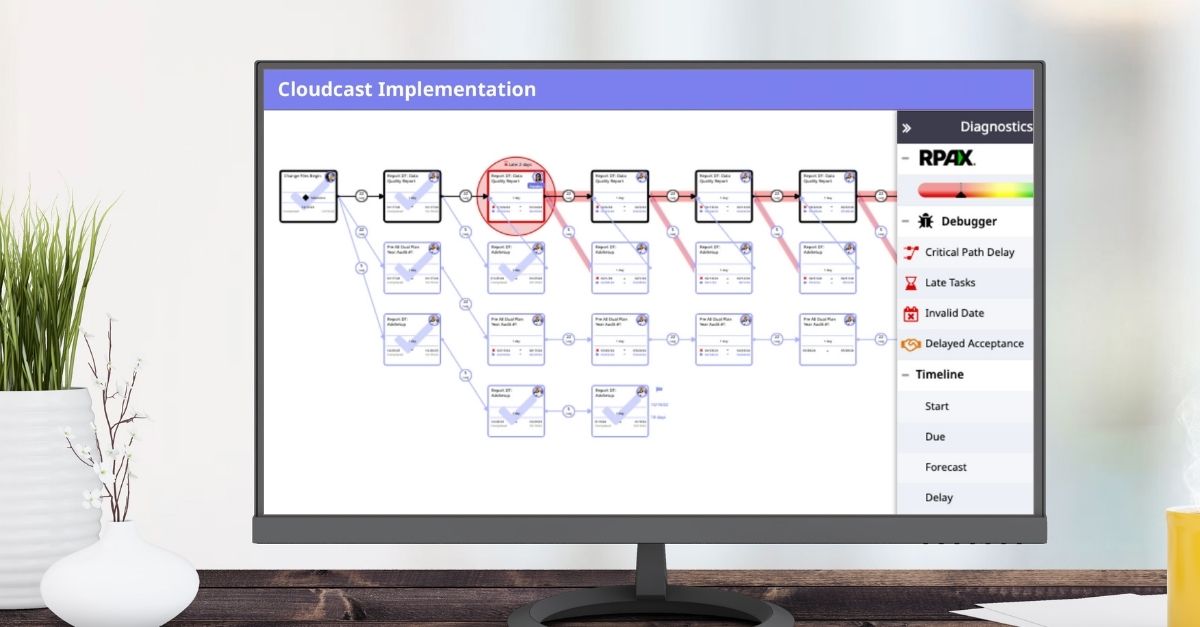
While most teams have some sort of project timeline, few actually trust them. That’s because creating a timeline is fairly easy, but keeping it realistic as tasks shift, dependencies change, and resources stretch thin is where things break down.
The term “project timeline” sounds compact and intuitive, but it is more like a suitcase that looks manageable on the outside and far more complex on the inside. Until you open it up, it is easy to underestimate how much is actually driving accuracy.
Let’s unpack the elements of a project timeline and examine why accuracy becomes difficult to maintain once real work begins.
Project Start Date
This is the day you plan to start this work. Plotting it is important to your plan. If your plan includes the duration of each piece of work that goes into a project, plugging in the start date will tell you the completion date. Or, if you have a solid project template that knows how long this work takes, plugging in the due date can tell you what your start date needs to be.
On its own, it seems simple. But the moment approvals stall, resources are unavailable, or upstream work slips, that date becomes wrong unless the timeline adjusts. Static start dates are one of the earliest contributors to inaccurate timelines. A trustworthy timeline does not just record dates. It recalculates them as reality changes.
Project Due Date
The project due date is the day that everyone involved has agreed that the work will be completed. A due date might be decided by a client’s pressing need. Or it might be imposed internally based on the workload and schedules of your team and other factors. It’s important to have a due date so that everyone working on the project has an end in mind.
The challenge is not setting a due date. The challenge is knowing whether it is still realistic. When timelines do not reflect changes in scope, task duration, or dependencies, teams lose visibility into risk. Projects do not suddenly become late. They drift there quietly.
Tasks
Every job can be broken down into chunks of work that can be done by a person or team in a manageable amount of time. Tasks are usually easy to define and summarize and can be completed in a few hours or days. Typically, tasks have an obvious order. Some tasks need to be finished before others can be considered but some can be worked on concurrently. A project is made up of many tasks, arranged into phases.
Most teams do this well. Where accuracy breaks down is when tasks are treated as fixed. Tasks change. New ones appear. Others take longer than expected. When timelines do not automatically account for those changes, accuracy erodes without obvious warning.
Phases and Task Structure
When planning a project, it is a good idea to structure the tasks into phases. At an MSP, these phases likely include the initiation or discovery phase, planning and equipment preview, implementation, validation and training, and monitoring and maintenance. Once you define the phases, you can assign beginning and end dates to each phase and schedule tasks into the correct phase.
But phase level clarity depends on task level accuracy. If individual tasks slip without adjusting downstream work, phase timelines still look structured but no longer reflect reality.
Work Estimates
An accurate work estimate is important to the success of a project. It defines what this project will accomplish for your team and the client. It gives you a basis for calculating pricing, timing, materials, and resource allocation. If it is clear, precise, and detailed it will help you to avoid scope creep by making it obvious to everyone what work is being done for the price quoted – and, therefore, what work is not.
Many estimates, however, are based on guesses, inherited assumptions, or outdated templates. When estimates are wrong, everything downstream suffers, including delivery dates and margins. This is one of the most common reasons timelines fail even when they appear complete.
Project Templates
A project template is like a power tool for building accurate work estimates and project timelines quickly. Once you build project templates for the jobs you do frequently, you can quickly fill in start dates or end dates to build a project with a template that already knows the tasks, durations, phases, and resource types needed for the work. You can daisy chain templates for smaller jobs together to create a larger project. Because templates can capture what you learn by executing work, they become more accurate as you use and update them.
But templates only create value if they improve over time. Static templates lock in outdated assumptions. Living templates evolve by capturing what actually happened during execution, not just what was planned. Without that feedback loop, templates create confidence without accuracy.
Duration
Duration is another term that is coded with meaning in the world of project management. It describes the length of time it takes to complete a task from start to finish. This isn’t the same as the hours you will spend on the task since the duration can include time that is not spent actively working on it. The duration measures the time that elapses from the moment you start working on the task until you mark it completed, even if you spend only an hour working on it each day.
Timelines run on duration. When durations are guessed, padded inconsistently, or never revisited, the entire timeline becomes unreliable. Accurate timelines depend on durations grounded in real execution.
Dependencies
In any project, one task might be dependent on the status of another. Most commonly, you can’t start one task until another is completed. For example, you can’t set up a workstation until the hardware has arrived. That is a finish-to-start dependency. There are four types of dependencies that you might use to manage a project: finish-to-start, finish-to-finish, start-to-start, and start-to-finish. Each one precisely describes how one task depends on another.
When dependencies are not set correctly or recalculated as tasks change, delays cascade silently through the timeline. This is one of the biggest drivers of unexpected delivery slip.
Milestones
A milestone is a significant event in the unfolding of a project. It is a useful marker along the way, giving goals to the team and setting a pace for the progress of work. Unlike the completion date, there can be more than one milestone in a project. But, similar to the completion date, when a team is aware there is a significant milestone approaching, it makes it easier to see why today’s tasks need to be completed.
But milestones only work when teams believe the dates. When milestone dates lose credibility, they stop driving behavior and the timeline loses its role as a planning tool.
Resource Type (and Capacity)
An important element of a project timeline is the team that will be tasked with the work. Each person has different skills and different pay rates. Choosing the right resource type for each task means knowing these things about every individual on the team. You don’t want to send a level three engineer to do something a level one engineer could do because you will spend too much money and create discontent on the team. At the same time, you need to assign the work to someone capable of accomplishing it. Getting this right during project planning helps you set an accurate budget.
When project timelines ignore real availability, ticket load, and on-call work, tasks look achievable on paper but fail in execution. If resources cannot complete the work as planned, the timeline is already broken.
Float
Building some float (or slack) into a project timeline is an art. This term defines the amount of time a task can be delayed without affecting the overall outcome of the project. It is calculated by subtracting the earliest start date from the latest start date, or the earliest finish date from the latest finish date of each task. Float can help you identify which tasks have some flexibility in their scheduling, which can help get a project back on track when another task is delayed.
Float only helps when it is visible and intentional. When float exists but is not tracked or recalculated, teams do not know where delays can be absorbed and where they cannot.
Lead and Lag
Some tasks cannot be accomplished in a day. Perhaps you need three days to prepare a scope or maybe you need a week to get approvals before you can order equipment. You can build this into the project as lead time before the task. This way the task shows up on the timeline with enough time to do the preliminary work necessary to accomplish the task when it is due. Lag time is the same type of padding, added to the end of a task. Instead of scheduling lead time before delivering the scope, you would add time after the client kickoff meeting to give you time to prepare that scope.
When these buffers are missing or applied inconsistently, timelines appear tighter than reality and small delays cascade into larger ones.
Managing timelines you can trust
Accurate project timelines require more than upfront planning. They require systems that adapt as work changes. When timelines look good on day one but drift by day ten, that is not a people problem. It is a tooling problem.
Moovila Perfect Project automates project timelines so they stay accurate as reality shifts. The result is fewer surprises, stronger budget alignment, and timelines teams can confidently rely on internally and share with clients.
If you are ready to stop guessing and start managing accurate project timelines, book a personalized demo to see how it works.
Project Management